Studio App
Studio is the planning layer that makes the hardware smarter. It turns show design, routing, safety checks, and field verification into one connected workflow — from your desk to the firing line.
Site Planner's separation zones, fallout visualization, and AHJ documentation export are built around NFPA 1123. See the full compliance mapping →
Web-based show design that speaks the same language as your field hardware — from first cue to post-show record.
Studio is PyroNext's show design and configuration tool. It runs in any modern browser — no install, no license dongle, no platform lock-in. Design your show at your desk, configure your field hardware, and export a verified show file that loads directly into your Connect 12 units. What you design in Studio is exactly what runs in the field.
Workflow
From show design to field execution — one connected workflow.
Build your show in Studio
Create your cue list and timeline. Assign effects to positions. Configure routing across your Connect 12 units and IQ Slats. Set intended mortar angles and bearings for each rack position. Studio knows your hardware — it validates routing against your actual connected equipment as you design.
Pre-show checks before you leave the desk
Studio runs pre-show checks against your show file — routing completeness, equipment inventory, angle assignments, and timing consistency. Catch problems at your desk, not in the field with a crew waiting.
Verified show file to Connect
Export a verified .em2show file — a compiled, verified show package that loads directly into your Connect 12 units via USB. The show file includes routing configuration, timing, angle targets for every slat, and the safety parameters for every firing sequence.
Site map and slat positioning
In the field, scan each IQ Slat's QR code with your phone. Studio GPS-pins that rack position to the slat ID automatically — no per-slat GPS hardware required. Your site map populates as you walk the field.
Angle verification at the rack
The IMU in each IQ Slat reports live tilt and bearing. Studio's angle targets are embedded in the show file — Connect 12's display flags any slat that deviates more than ±5° from its design position before you arm. No guessing, no eyeballing.
Post-show telemetry
After the show, load the telemetry record from Connect into Studio. Review firing confirmations per channel, fault events, PSU readings, peak temperatures, and ignition confirmation status for every cue. Full record for compliance, insurance, or reliability review.
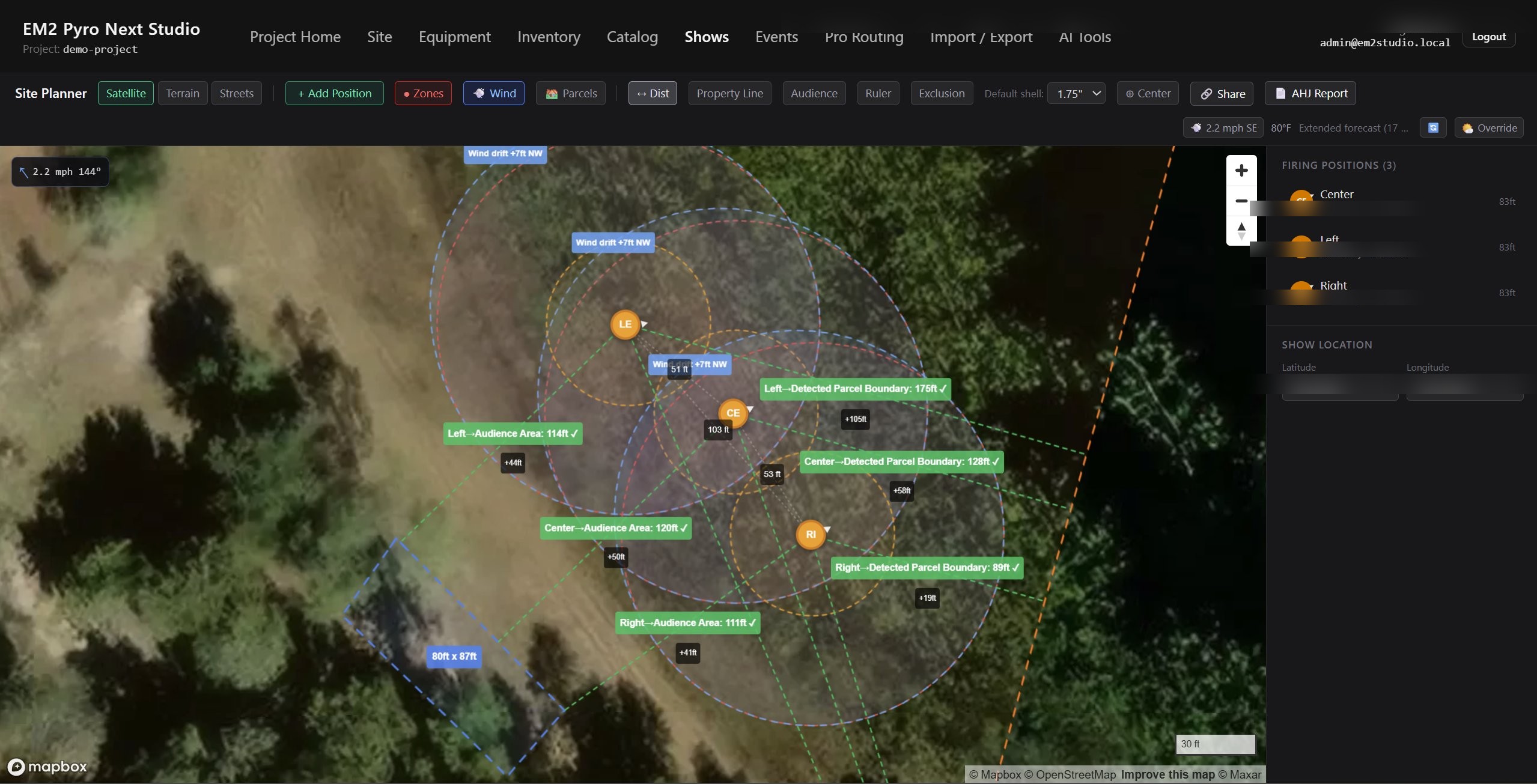
Site Planner — satellite map with firing positions, safety zone enforcement, audience area calculations, wind drift overlays, and parcel boundary detection.
Features
Everything from first cue to post-show record.
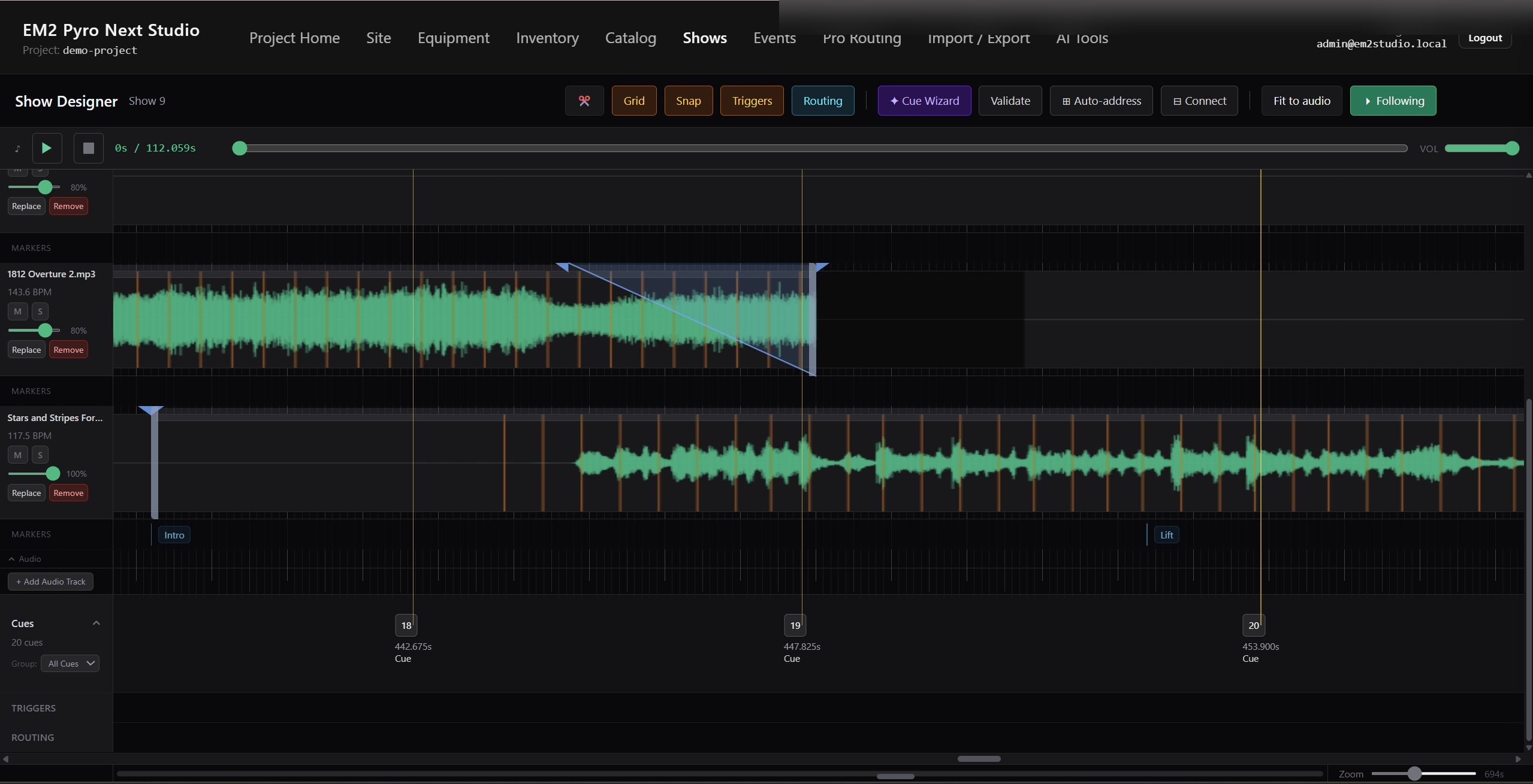
Show Designer — audio-synced timeline with cue markers, routing, and trigger management across multiple tracks.
Cue list and timeline design
Build your complete show cue list with timing, effects, and position assignments. Studio's timeline is hardware-aware — it validates cue assignments against your actual Connect and IQ Slat configuration as you work.
Routing configuration
Assign output banks across your Connect 12 units and IQ Slats. Configure one-to-many routing — fan a single cue across multiple positions for mirrored looks or redundant product. Studio validates routing completeness before export.
Per-block firing mode configuration
Set each output block to parallel, serial, or sequential firing mode directly in Studio. No jumpers, no field rewiring — the configuration is embedded in the show file and loaded to Connect automatically. Changes take seconds, not minutes.
Mortar angle design
Assign intended tilt and bearing to each rack position in Studio. These targets are embedded in the show file and associated with each slat ID. In the field, Connect 12's display shows live angle deviation for every slat — so you dial in the physical rack against the design target.
Inventory and equipment management
Track your Connect 12 units, IQ Slats, cable harnesses, and firing inventory. Studio knows what equipment your show requires and validates it against what you have assigned before export.
Site map with GPS positioning
Build a GPS-accurate site map without per-slat GPS hardware. Scan each slat's QR code in the field with a phone — Studio GPS-pins that position to the slat ID automatically. The map populates as you walk the site.
Pre-show safety checks
Studio validates your show file before export: routing completeness, equipment availability, angle assignments, timing consistency, and firing parameter correctness. Catch configuration problems at your desk, not in the field.
Verified show file export
Studio exports a verified .em2show file — a compiled, integrity-verified show package. Connect validates the file on load, ensuring the show file hasn't been modified or corrupted after export. The show you designed is the show that runs.
Post-show telemetry review
Load the telemetry record from Connect after the show. Review firing confirmations, ignition status per channel, fault events with timestamps, PSU voltage readings, peak enclosure temperatures, and continuity state throughout the show. Exportable for compliance documentation or reliability records.
Web-based — no install required
Studio runs in any modern browser. No software to install, no license dongle, no platform lock-in. Access your show files from your laptop, tablet, or any device with a browser. Show files are stored locally — no cloud dependency in the field.
The connection
Studio speaks hardware. Hardware executes design.
Studio and Connect use the same language — the same routing model, the same bank addressing, the same angle system, the same firing profiles. There's no translation layer, no import/export friction, no "does the software match the hardware" uncertainty. Design in Studio, load to Connect, verify in the field. That's the full loop.
Every feature in Studio has a corresponding capability in the hardware. One-to-many routing configured in Studio becomes actual routing in Connect. Angle targets set in Studio are verified by the IMU in every IQ Slat. Firing modes selected in Studio are enforced in the switching hardware on every channel. The show file is the contract between design and execution.
Studio is currently in active development alongside the Connect 12 and IQ Slats. Early access and integration conversations are open — reach out if you'd like to be involved.